RAID & NAS Data Recovery
Whether your RAID array has failed because of hardware, software or a combination of both, we offer expert solutions tailored to your situation to recover your data safely.
We reconstruct failed RAID arrays of every common level — RAID 0/1/5/6/10/50/60, JBOD and proprietary systems like Synology SHR or ZFS pools. After multiple disk failures, controller faults or a failed rebuild, we image every member disk first and reassemble the array virtually, so the original disks are never put at further risk.
Pricing
Indicative prices by array size
| Number of disks | Price |
|---|---|
2–4 disks Small NAS, home servers | from €259 |
5–10 disks Business NAS, smaller servers | from €499 |
10–20 disks Server RAID, storage systems | Individual quote |
20+ disks Enterprise storage, SAN | Individual quote |
Prices are indicative. The final price is set after diagnostics, based on the actual condition of the device.
Case Studies
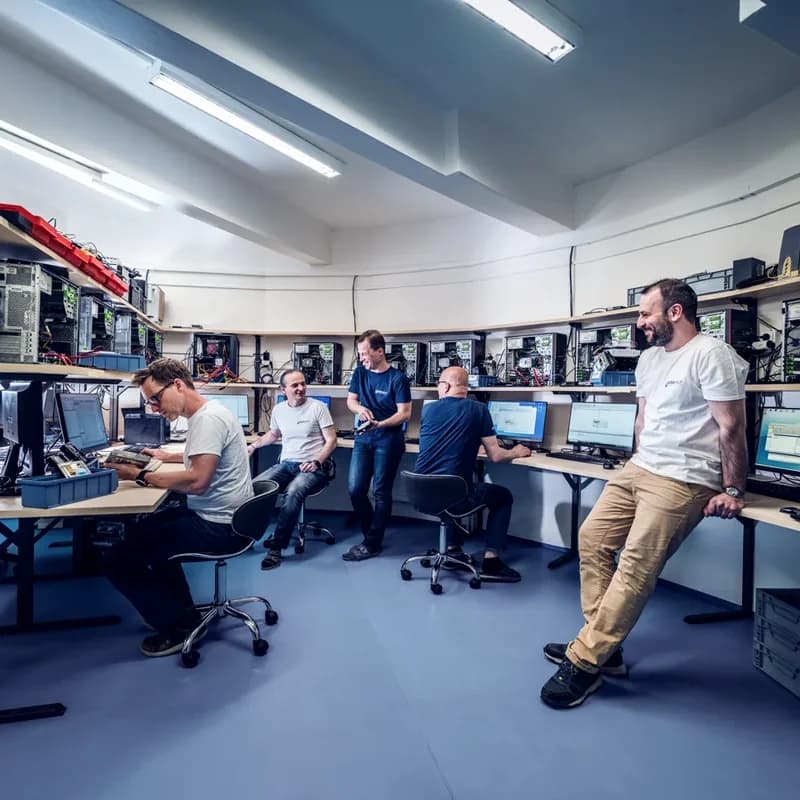
RAID 5 Server Crash with Accounting Data
Success rate: 100%7 days
Two disks in a RAID 5 array failed at the same time. The server held the complete accounting and ERP system of a medium-sized manufacturing company.

Lost QNAP NAS Configuration
Success rate: 99%5 days
After a firmware update, the RAID configuration was lost. The NAS contained 8 disks in RAID 6 with critical project data.

Ransomware on Synology NAS
Success rate: 95%6 days
A company NAS was hit by ransomware that encrypted critical data. The backups were incomplete.
Most common RAID array problems:
- •Faulty cabling between the controller and the disks
- •Damage to one or more hard drives
- •Partially overwritten data
- •Incorrect array configuration
- •Controller problems or damage
Supported RAID configurations:
- •RAID 0 (striping) – data split across multiple disks for speed
- •RAID 1 (mirroring) – data mirrored to protect against loss
- •RAID 5 (parity) – data protection with efficient use of disk space
- •RAID 6 (double parity) – enhanced protection that tolerates up to two disk failures
- •RAID 10 – combines RAID 0 performance with RAID 1 redundancy
- •RAID-Z – advanced RAID in the ZFS file system
- •Combined RAID configurations – e.g. RAID 0+1, RAID 50, RAID 60 for balanced performance and reliability
Supported file systems:
- •Windows (FAT, NTFS, exFAT)
- •Linux (EXT2, EXT3, EXT4, Btrfs, XFS)
- •macOS (HFS, HFS+, APFS)
- •Novell (including NWFS and NSS)
- •Unix (and other advanced systems)
How to proceed
It doesn't matter whether your array was hardware-based, software-based or another type. Before submitting the form or emailing us, gather as much information as you can about the array configuration.
In cases of severe damage, it helps if you can tell us what kind of data the array held (documents, photos, video, accounting data, etc.). The best protection against data loss is regular backups.
Why do disk arrays fail, and how can the data be recovered?
RAID (Redundant Array of Independent Disks) is a technology that combines several physical disks into a single logical volume. Although disk arrays offer a certain level of data protection, they are no substitute for backups. Arrays can fail for many reasons, and recovering the data requires specialised knowledge and equipment.
The most common cause of array failure is several disks failing at once. In single-parity configurations, a second disk failing during the rebuild can mean complete data loss. Double parity tolerates two disk failures, but problems can still occur if a third disk fails during reconstruction.
Another common problem is a degraded array that keeps running with a faulty disk. Users often miss the warning signs, and the next failure leads to data loss. Regular monitoring of the array status and timely replacement of faulty disks are the key to prevention.
Detailed configuration overview
Level 0 (Striping)
Data is distributed evenly across two or more disks without redundancy. This gives the highest performance, but the failure of a single disk means the loss of all data. Recovery requires reconstructing the stripe order and size.
Level 1 (Mirroring)
Data is mirrored on two disks. If one disk fails, no data is lost, but if both fail, professional recovery is needed. Recovery is usually easier because a complete copy of the data exists.
Level 5 (Parity)
Striping with distributed parity. Requires at least 3 disks and tolerates the failure of one. Recovery after two disk failures is complex – it requires reconstructing parity blocks and working around bad sectors.
Level 6 (Double Parity)
An extension of level 5 with a second parity block; tolerates the failure of two disks. Ideal for larger arrays, where multiple failures are more likely. Reconstruction is computationally intensive.
Level 10 (1+0)
A combination of mirroring and striping – data is first mirrored, then striped. It offers high performance and redundancy but requires at least 4 disks.
Controllers and NAS systems
Data recovery also depends on the controller type. We work with all common controllers:
- • Dell PERC – H730, H740, H840
- • HP Smart Array – P410, P420, P840
- • LSI MegaRAID – 9361, 9460
- • Adaptec – 8405, 81605ZQ
- • Intel – RST, VROC
- • Broadcom –
- • Software arrays – mdadm, ZFS, Windows Dynamic Disks
- • FakeRAID – built into the motherboard
NAS storage
Most NAS devices use disk arrays to protect data. We specialise in recovering data from these configurations:
- • Synology – DSM with SHR (Synology Hybrid) and standard configurations
- • QNAP – QTS with RAID levels 0, 1, 5, 6 and 10
- • WD My Cloud – personal and business NAS
- • Buffalo, Netgear, Asustor – all configurations
NAS devices use specific file systems (Btrfs, ext4, XFS) and proprietary metadata. Our tools can reconstruct arrays even without the original device.
Our team rebuilds RAID arrays by first creating bit-level clones of every drive and then reconstructing the drive order, stripe size, parity rotation and data offset. We handle hardware controllers (Dell PERC, HP SmartArray, LSI MegaRAID, Adaptec, Areca) as well as software RAID (mdadm, ZFS, Windows Dynamic Disks, Storage Spaces). Free diagnostics, a fixed price upfront – No Data, No Fee.
Recovering data from a RAID array requires specialised knowledge and tools. Our technicians have extensive experience with all common RAID configurations — from simple mirroring (RAID 1) through RAID 5, RAID 6 and RAID-Z to combined RAID 50/60 configurations and proprietary vendor systems (Synology SHR, Drobo BeyondRAID, ZFS pools).
RAID arrays are used mainly in business environments — in servers, NAS devices and storage systems. Losing data from a RAID array therefore usually means a critical business outage. The most common causes are successive failures of several drives, incorrect controller configuration, failed rebuilds and corrupted parity data.
During RAID recovery, we first create bit-level clones of every drive in the array (we never work on the originals). We then reconstruct the array configuration — drive order, stripe size, parity rotation and data offset — using specialised hardware and software that can handle arrays in which two or more drives have failed at the same time. We work with hardware RAID controllers (Dell PERC, HP SmartArray, LSI MegaRAID, Adaptec, Areca) as well as software RAID (Linux mdadm, ZFS, Windows Dynamic Disks, Storage Spaces).
For businesses, we offer express processing by prior arrangement to minimise downtime. You receive a fixed quote before recovery starts. Send the disk array or the complete server with your preferred carrier, or book optional insured DPD pickup for €45.
Supported configurations
| RAID levels | RAID 0, 1, 5, 6, 10, 50, 60, JBOD, RAID-Z, RAID-Z2, RAID-Z3, Synology SHR, Drobo BeyondRAID |
|---|---|
| Controllers | Dell PERC, HP SmartArray, LSI MegaRAID, Adaptec, Areca, Intel RST (hardware) + mdadm, ZFS, Windows Dynamic Disks, Storage Spaces (software) |
| File systems | Windows (NTFS, ReFS, FAT), Linux (ext2–4, XFS, Btrfs, ZFS), macOS (HFS+, APFS), VMware VMFS, Microsoft CSV |
| Vendors | Synology, QNAP, Buffalo, Asustor, Drobo, Netgear ReadyNAS, Thecus, HPE MSA, Dell EqualLogic, IBM Storwize |
What to do if your RAID fails
Stop all write activity immediately — further writes can corrupt parity across the array.
Label each drive with its original slot position before removing any disk.
Contact us before attempting a rebuild – rebuilding a degraded array with read errors can make the data unrecoverable.
Note the controller model, array configuration (RAID level, stripe size) and any controller logs — this speeds up diagnostics considerably.
RAID array repair vs. data recovery
When a RAID array fails, the temptation is to "just rebuild it" by replacing the failed drive. For arrays with a single failure and no latent drive errors this can work — but with degraded arrays that have multiple bad sectors or two failed drives, a rebuild typically overwrites recoverable data and makes professional recovery significantly more expensive or impossible.
We specialise in data recovery, not array repair. We recover the data, return it on a new, verified drive and leave the decision about rebuilding the production array to you and your IT team. This separation is deliberate — recovering data and rebuilding a production array are fundamentally different processes, and mixing them risks data loss.
Once we have recovered the data, your administrator can safely replace drives, rebuild the array (or migrate to a new one) and restore from the recovered data. If you need urgent operational support during the recovery, we can coordinate with your IT provider and share the recovery schedule.
Do not attempt a rebuild on a failed array
The most common mistake after a RAID failure is attempting an automated rebuild by inserting a replacement drive. If any of the surviving drives has latent bad sectors (very common after years of operation), the rebuild will fail mid-way and can overwrite critical parity data, turning a recoverable situation into a total loss.
Do not remove drives from their original slot positions, do not re-initialise the controller, and do not accept "foreign configuration" prompts. Power the server off and label every drive before removal. Contact us first in writing — your initial enquiry is free and we can usually tell you quickly whether the array is safe to rebuild or requires recovery.
Why choose DataHelp for RAID recovery?
Professional RAID recovery requires in-depth knowledge of the specific RAID implementation used by your controller or NAS vendor. Each vendor (Synology SHR, Drobo BeyondRAID, ZFS, Dell PERC, HP SmartArray) stores metadata and parity information differently, and generic recovery tools cannot reliably reconstruct these proprietary formats.
Our team has recovered hundreds of RAID arrays from all major vendors — from small home NAS units (two-drive mirrors) to enterprise arrays with 20+ drives and JBODs. We use ACELab PC-3000 Data Extractor RAID and R-Studio Technician for reconstruction, backed by our own scripts for vendor-specific formats (Synology SHR variants, LVM on top of mdadm, importing ZFS pools with missing drives).
For enterprise customers, we can sign an NDA and offer expedited service with a dedicated technician and a coordinated delivery schedule. Our team has more than 35 years of experience (since 1990); we operate ISO Class 5 laminar flow boxes for work on individual drives and keep 10,000+ donor parts in stock for drive failures within the array.
Frequently asked questions — RAID recovery
RAID recovery prices depend on the number of drives, the array configuration and the type of failure. Small arrays (2–4 drives): from €259. Medium arrays (5–10 drives): from €499. Larger arrays: individual quote. If recovery fails, there is no recovery fee (the optional €45 pickup fee is non-refundable).
Diagnostics take 1–2 days. Standard recovery takes 3–14 days depending on the damage. For urgent cases we offer Priority (24–72 hours) and Express (12–48 hours) for a surcharge; EcoHelp (4–6 weeks) is available at a reduced price. To keep your business running, we can prioritise your case.
Usually only the drives are needed. If you are unsure about the configuration (drive order, RAID level, controller model), we recommend shipping the entire server or NAS so we can extract the configuration directly from the controller firmware or NAS OS.
Yes. We comply with the GDPR, sign NDAs on request, and only authorised technicians have access to your drives. Every recovery is documented, and we can provide a chain-of-custody report on request. After recovery, the original drives are either returned or physically destroyed — never reused.
You may be interested in:
Related articles:
Our technology and capabilities
We keep investing in cutting-edge tools and expanding our recovery capabilities
Virtual RAID
Advanced tools for reconstructing virtual RAID arrays from VMware, Hyper-V, and other virtualisation platforms.
NAS Recovery
Specialised data recovery from Synology, QNAP, WD My Cloud and other network storage devices.
ZFS and Btrfs
Support for ZFS and Btrfs, the modern file systems used in enterprise NAS solutions.
Trusted by industry leaders
Serving enterprises, institutions and organisations across Europe since 1998









Need to recover a RAID array?
Request a free case assessment or contact us for more information.
Related guides
Useful reading before or after data recovery
The 3-2-1 Backup Rule — Your Data Insurance Policy
The 3-2-1 rule is the simplest proven strategy to protect your data: 3 copies, 2 different media, 1 offsite. Here's how to implement it.
Read guide
How to Clone a Hard Drive — Complete Guide
Step-by-step guide to drive cloning: when you need it, how to prepare, best tools, HDD vs SSD specifics, and troubleshooting common problems
Read guide
How to Recover Deleted Files — Methods, Risks, and When to Call a Pro
Step-by-step guide to recovering deleted files — from checking the Recycle Bin to using Recuva to professional recovery. Plus the one critic
Read guide